

eBay shoppers don’t click the first result they see and make an immediate purchase.
Broad ecommerce stats show that average shoppers browse 6 to 7 listings per session, and up to 10 or more when evaluating used, vintage, or high-ticket items, before making a final purchase decision.
An eBay listing template arranges condition, specifications, shipping, and return policies into a consistent, mobile-friendly layout. Instead of rebuilding every description from scratch, sellers can update product details inside a structured framework.
This saves valuable publishing time, reduces costly omissions, keeps branding cohesive across large catalogs, and gives stores a clean presentation.
With more than 70% of eBay shoppers browsing on smartphones and tablets, responsive design is no longer optional. Studies show that well-structured HTML templates can increase conversion rates by up to 35% compared to plain text descriptions.
Hence, in the current eBay ecosystem, a template serves as a scalable sales system for building buyer confidence, streamlining comparison shopping, and converting routine page views into completed orders.
Key takeaways
- Reusable listing templates can reduce listing creation time by up to 40%.
- Designing templates with standardized, collapsible policy blocks helps eliminate description clutter and speeds up mobile buyer scrolling.
- Structuring essential Item Specifics, shipping details, and business policies into clear template sections can increase listing conversion rates by up to 35%.
- Consistent description frameworks lower return rates by preventing accidental omission of important details and reducing Item Not as Described (INAD) buyer claims.
- Using a uniform layout across your catalog establishes your brand and builds buyer trust.
What are eBay listing templates, and how are they used?

An eBay listing template is a pre-formatted blueprint that standardizes a listing’s visual layout and description structure. Rather than drafting each listing manually, sellers use templates to automatically populate Item Specifics, shipping policies, and branding when listing products in bulk.
Sellers typically utilize two distinct listing types:
- eBay Seller Hub Templates (Backend) – presets with saved listing settings, such as payment preferences, default shipping rules, and return terms.
- HTML Description Templates (Frontend) – visual layouts built with HTML and inline CSS to showcase banners, specification tables, and business policy tabs.
Merchants who implement custom HTML templates into their listings must comply with eBay’s Active Content Policy, as JavaScript, Flash, external iFrames, and off-site links are strictly prohibited to ensure fast rendering and security.
Mobile optimization is equally critical. On mobile devices, eBay automatically truncates product descriptions into an 800-character mobile summary.
Properly built templates account for the mobile viewport, ensuring that vital product details, condition notes, and shipping terms render cleanly.
How sellers deploy templates across different product categories
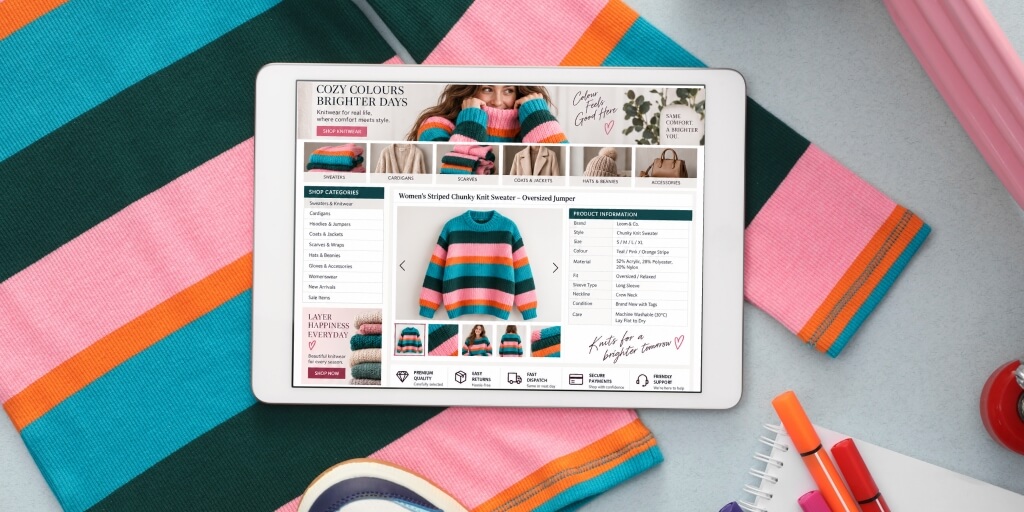
High-volume eBay sellers rarely rely on a single, rigid listing layout. Instead, they deploy multiple templates adapted to the specific demands of different product categories and inventory structures.
Sellers commonly apply templates across their catalogs through three primary strategies:
- Category-specific layout variations: A multi-category retailer adapts its core eBay description template depending on buyer expectations. Electronics listings prioritize technical specification tables and compatibility. Conversely, fashion or apparel listings adjust the template structure to highlight sizing charts, material callouts, and multi-angle photo galleries.
- Condition-based detail blocks: Sellers dealing in pre-owned, refurbished, or vintage inventory utilize templates with dedicated condition modules. These pre-formatted sections force a uniform presentation of item flaws, cosmetic grading, and included original accessories, ensuring critical details aren’t accidentally omitted during rapid listing creation.
- Standardized store branding and business policies: Sellers usually keep elements that build trust static. Store headers, shipping timelines, warranty disclaimers, payment, and return policies should remain identical across all category templates.
Strategic advantages of using listing templates in your eBay store

Managing an expanding eBay catalog without a structured system quickly leads to longer listing times, inconsistent descriptions, and missed sales.
Adopting listing templates resolves these operational bottlenecks through four key advantages:
- Efficiency: Pre-populating recurring policies, shop headers, and feature lists eliminates repetitive typing, allowing sellers to publish new inventory faster.
- Consistency: A fixed layout creates an automated checklist for every post, preventing the omission of critical product specifications or compatibility details.
- Trust: Prominently displayed policies, clearly visible payment and fulfillment terms, and unified branding reduce buyer hesitation during quick comparison shopping.
- Scalability: Modular designs enable virtual assistants, team members, and third-party eBay software tools to bulk-list large volumes of SKUs without compromising quality.
Ultimately, these combined operational gains shift a seller’s focus away from administrative overhead, transforming individual listings into a unified, high-converting storefront built to scale.
Key elements of eBay listing templates
A professional template structures complex listing data into distinct visual zones, leading buyers naturally from initial product discovery to final checkout.
Strong branding and purchase details should be at the top of the layout. Displaying your store logo alongside key value propositions, such as authorized distributor badges or same-day dispatch guarantees, builds credibility.
Directly below, the product overview and image gallery pair concise titles with high-resolution, multi-angle product photos, allowing shoppers to evaluate core features and condition at a glance.
To maintain high visual scannability, detailed features and specifications should move away from dense paragraphs and into structured HTML key-value tables.
Doing so allows buyers to instantly extract part numbers, dimensions, and fitment data.
Finally, dedicated modules for item condition, seller policies, and calls to action round out the page.
Explicitly detailing cosmetic wear alongside clear 30-day return policies and shipping terms addresses buyer hesitation directly at the point of decision.
Where to find eBay listing templates?
Finding the right template sourcing method depends on your technical comfort, budget, and inventory scale. Hence, the tools you’ll need to create separate templates vary depending on whether you’re creating a custom template or adjusting a pre-designed template you acquired from a theme library.
eBay native tools
Sellers seeking basic structural templates can build and save them directly within eBay’s Seller Hub. The platform allows merchants to create up to 50 reusable forms that pre-fill core item specifics, shipping rules, and payment terms.
Alternatively, using the platform’s native Sell Similar action lets you duplicate past listing layouts for new inventory without handling external files.
No-code visual builders and theme libraries
For sellers wanting branded design without coding, web-based visual builders offer pre-designed, drag-and-drop template libraries.
These platforms provide pre-formatted themes tailored to specific categories like fashion or electronics. They automatically export responsive HTML and static CSS that meet eBay’s active content standards.
Custom code
High-volume brands requiring unique storefront designs often hire web developers or purchase premium design assets.
Custom HTML files give you absolute control over element placement, brand identity, and mobile viewports. If choosing custom files, ensure the code strictly omits prohibited elements like JavaScript to prevent platform search penalties.
How to customize an eBay listing template

Tailoring a raw layout to your brand requires a simple six-step workflow to ensure your template looks professional and remains fully compliant with eBay’s guidelines.
Audit the base HTML code
Select a responsive, single-column template. Inspect the code in an editor to confirm it relies strictly on inline CSS and omits prohibited JavaScript or external frames.
Upload brand elements
Replace placeholder assets with your store logo and trust badges, such as authorized distributor status or same-day dispatch guarantees, hosted on secure HTTPS servers.
Format product and item specifications blocks
Insert dynamic tags for item titles and descriptions. Convert specifications, dimensions, and compatibility details into structured key-value HTML tables for easy mobile viewing.
Configure business policy modules
Add standard business terms to compact CSS blocks covering shipping, payment, and 30-day return policies, alongside clear item condition notes.
Validate compliance and responsiveness
Run the code through eBay’s listing preview tool. Check if all elements load quickly, fit within mobile screens, and trigger zero active content flags.
Save the design as a master template
Import the edited code into eBay Seller Hub or your listing tool and save it as a master file for rapid, consistent catalog publishing.
Common eBay listing template mistakes sellers should avoid
HTML template layouts can harm your conversion rates if they introduce visual friction, violate platform rules, or distort on mobile screens.
A frequent error is building overcrowded, desktop-first templates packed with competing banners, excessive fonts, or complex multi-column structures.
Such layouts often break on smartphones, forcing buyers to scroll horizontally or wade through dense text just to find basic product information.
Since mobile traffic drives the majority of eBay sales, sacrificing clean, single-column scannability directly impacts the listing’s conversion rate.
Relying on generic stock layouts or outdated themes can make it difficult to establish a strong brand identity and obscure core value propositions.
Including prohibited active content, such as JavaScript or external iFrames, or adding outbound links, triggers immediate search demotions or listing suspensions under eBay security policies.
Compliance relies on exact alignment between your code and your account settings. Copying third-party HTML code risks intellectual property disputes, while displaying template policy terms that contradict your native Seller Hub settings creates buyer friction.
Maintaining an effective design requires keeping your HTML static, hosting images exclusively on secure HTTPS servers, and testing every layout across multiple mobile screen sizes before publishing.
How to test and maintain your eBay listing templates
Deploying a high-converting template is an ongoing process rather than a one-time setup. To maintain peak search visibility and sales momentum, sellers must regularly evaluate layout efficiency, test strategic design tweaks, and execute routine technical upkeep.
Assessing a template’s performance begins inside eBay Seller Hub by tracking key metric movements following any design update.
Monitoring conversion rates, impression shares, organic traffic, and click-through percentages reveals how effectively your visual layout guides shoppers toward checkout.
A sudden dip in buyer conversion signals performance bottlenecks, such as slow-loading graphics or distorted mobile viewports that disrupt the buyer experience.
Rather than overhauling an entire design at once, test individual variables like moving trust badges above the fold, altering value specification table styles, or adjusting policy layouts across similar catalog SKUs.
Comparing these metrics provides clear insights into what template layout solutions drive higher buyer engagement for your specific products.
Proactively refreshing design assets and removing redundant inline styles keeps your listings lightweight, fast-loading, and fully optimized for continuous catalog growth.
Improving your store’s performance with eBay listing templates
A well-crafted listing template is more than just a visual upgrade. It is a core engine for seller growth.
By replacing dense, unstructured text with mobile-first layouts, specifications grids, and clear store policies, listing templates reduce buyer friction, enhance search engine performance, and streamline your catalog operations.
Keeping your code lightweight, static, and platform-compliant ensures your storefront remains fast and ready to scale.
Webinterpret’s Product Recommendations feature adds related products to your product listings without disrupting a template’s layout. Schedule a call to learn more about how our eBay solutions can drive your business’s international expansion.
About Webinterpret
Webinterpret supports merchants selling on eBay.
Our AI-based solutions enable more effective selling through automated listing localisation, optimisation, advertising, and returns, and ensure all products placed on EU markets are GPSR-compliant.
By giving your international and domestic customers a full, end-to-end local shopping experience, Webinterpret improves your conversion rates and helps establish your business locally and globally