Recent data show that 80% to 90% of listings on eBay are created by 30% of the online marketplace’s top sellers.
On average, a casual seller creates between 1 and 10 new listings every week, while active sellers launch 5 to 25 listings daily. The top 5% or roughly 900,000 eBay businesses create the majority of the platform’s listings, posting between 50 and 200 new listings every day.
A glance at the statistics makes it clear that the most successful sellers on eBay rely on listing volume to generate steady sales streams.
Even when using eBay listing tools to create vast numbers of new listings daily, sellers must ensure that each title fits the platform’s character limit, includes essential product information, and contains the keywords potential buyers are likely to type into the search bar.
We’ll show you how to create listing titles that ensure your products will be featured in the results shoppers on eBay see when they search for a particular product.
Key takeaways
- Although the character limit for eBay listing titles is set at 80, the platform displays only 30 to 50 characters of a title on mobile devices.
- 53.4% of organic traffic comes from mobile devices, which makes title optimization for mobile devices mandatory.
- The highest number of new listings on eBay is created between October and December, as sellers broaden the range of their products to meet the peak season demand.
- High-converting listing titles allow the buyer to quickly identify the product type, manufacturer, model, and condition.
- Using title case in a product listing title makes it more readable, but capitalizing each letter in the title can negatively impact the listing’s click-through rate (CTR).
Reasons why eBay listing titles are essential for product sales

Eye-tracking studies have revealed that most online shoppers look at the first two or three words of a listing title to determine whether the listing matches their search intent.
As a result, sellers have seconds to capture a buyer’s attention and provide enough information about the product to prompt a click on the listing.
A title that seems too spammy or salesy may cause a potential buyer to hesitate, browse past a listing, or consider offers from other sellers.
Hence, the first few words in a title are essential, as they usually convey information about the brand and product type. The opening words of a listing title should closely match the buyer’s search intent, followed by size and condition modifiers.
Additionally, the platform’s algorithm uses listing titles as a criterion when recommending products in the search results.
Cassini checks whether the listing title contains relevant keywords, matches a specific buyer query, and removes all listings that don’t include the search term the user entered in the search bar.
That’s why listings that don’t contain a product brand and type in the title are likely to be excluded from the first-page results.
Understanding your target audience’s search intent
eBay attracts around 16 million enthusiast buyers who purchase products on the platform at least six times per year and spend over $800 annually.
This means that the majority of eBay shoppers are either occasional buyers who purchase fewer than 6 products per year or value seekers who exclusively search for deals and discounts.
The distribution of enthusiast buyers varies by category, so eBay Motors and Collectibles attract more high-intent buyers. On the other hand, everyday household items, fast fashion, and phone accessories commonly attract price-conscious shoppers seeking the best value.
So, to create a listing title that draws shoppers’ attention, sellers must first understand who their target audience is and what queries they are most likely to enter in the search bar.
Researching keywords for eBay product listing titles

To reach its target audience, a listing must send trust signals to eBay’s search algorithm that recommends the products for all search queries on the platform.
The algorithm relies on keywords to determine which listings best match the user’s search criteria, so adding filler words, such as Nice, Beautiful, or Must See, to a title will affect its search rankings.
Consequently, sellers must find keywords for each listing title they create that both match what buyers type into the search bar and allow Cassini to easily understand the essential product information.
The easiest way to check which queries buyers are entering into eBay’s search bar is to use the Search Autocomplete option, which shows search phrase suggestions based on search volume.
However, not all keywords add the same value to a title. Let’s take a look at keyword types and how each type can help improve a listing’s search visibility.
Types of keywords for listing titles that match buyers’ search intent

When creating a new listing title, sellers can follow a simple formula:
Product type + Brand + Key Feature + Size (or other specifications) + Condition
Due to the platform’s character limit for listing titles, keywords at the front of the title carry more value than those at the end. As a result, keyword types vary depending on their distance from the first word.
Primary
Primary keywords or keyword phrases usually span 3 to 5 words or 20 to 30 characters and contain information about the product type. These types of keywords are always placed at the front of a title to ensure they’re clearly visible to buyers on all devices.
Examples:
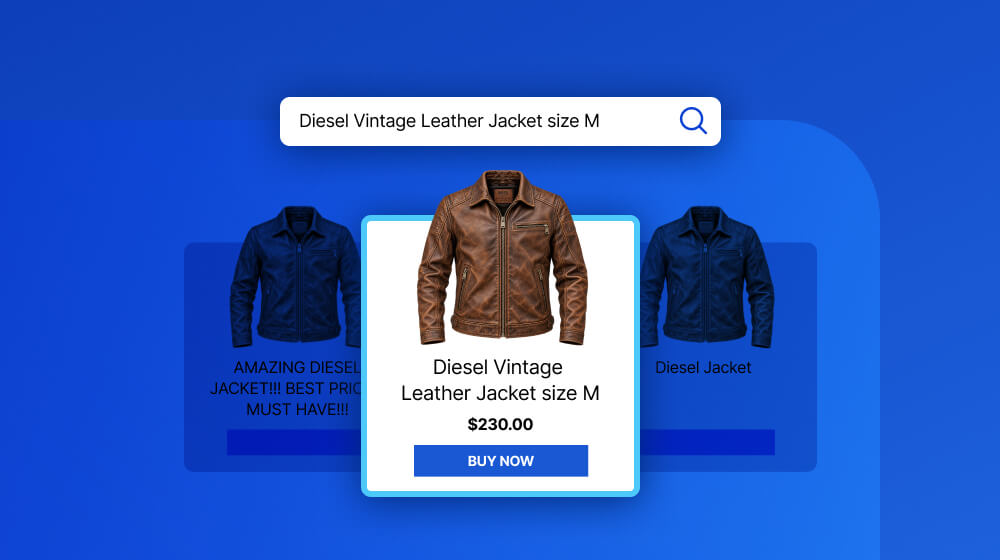
- Diesel Vintage Leather Jacket
- Nikkor Analog Photo Lens
- Apple iPhone 17 Pro
Secondary
Information about the product’s features or specifications should be placed after the primary keyword. These search terms are closely related to the primary keyword and align with its search intent.
Examples
- Mohawk Logo Only the Brave
- Compatible with Nikon and Canon Cameras
- Blue Titanium or 256GB
Tertiary Keywords
eBay sellers commonly use tertiary keywords for the terms they place at the end of a listing title. These keywords can indicate whether a product is new, used, or refurbished, its size, which accessories are included with the product, or highlight an item’s special features.
Examples
- Size L (42-44 US)
- Prime 35mm
- New with Tags, Excellent Used Condition (EUC), Good Used Condition (GUC)
5 tips for creating titles that generate organic traffic

eBay offers clear guidelines for writing listing titles that perform well on its search engine.
Hence, each title should follow these guidelines:
- The title length is under 80 characters
- The title cannot be copied from the manufacturer
- The title shouldn’t contain spelling errors
- The title cannot contain prohibited words
- The title cannot contain false or misleading information
- The title shouldn’t contain promotional text
Following these best practices enables sellers to create listings that avoid penalties and provide a solid foundation for search engine optimization by ensuring the title is unique, relevant to buyers, and informative.
Still, implementing the platform’s recommendations for creating a listing title isn’t always enough to ensure visibility on a particular eBay marketplace. We’ve prepared tips to help you improve eBay titles and drive organic traffic to your store, so let’s take a quick look.
Maximize the available character space
Include only the vital information potential buyers may need before opening a listing and reading the product description. Avoid using words, phrases, or special characters in titles that take up a lot of space while adding little or no value.
Sellers should steer clear of using shorthand and abbreviations that buyers may not know, so instead of writing SW or HW, it’s better to use ‘Stoneware’ and ‘Hardware’.
Front-load keywords
Besides being mindful of character space, eBay sellers must also ensure that the listing’s primary keyword will be displayed in search results regardless of the device a shopper is using to access the marketplace.
Consequently, the primary keyword should always be at the beginning of a title. It’s important to remember that repeating keywords in a title can be considered keyword stuffing and result in penalties.
Eliminate filler words
Since the maximum number of characters a listing title can have is limited, sellers must evaluate the importance of each word they add to the title.
That’s why, as a general rule of thumb, sellers should exclude filler words or phrases like Beautiful, Nice, Works Great, from titles, as they occupy valuable character space while bringing almost no value to the user or eBay’s search engine.
Don’t capitalize each letter in the title
Capitalizing each word of a title improves its readability and makes it look more professional. On the other hand, using uppercase for each letter of the title can affect the listing’s search performance because Cassini recognizes all-caps titles as low-quality listing text.
All-caps titles make it more difficult for the algorithm to match them to the keywords they feature, so the algorithm suppresses listings with such titles in the search results.
Moreover, using all caps in titles can directly impact a listing’s CTR, waste character space, and prevent mobile shoppers from seeing the full title.
Use eBay title builder tools cautiously
Automating listing title generation helps sellers save time by eliminating a repetitive, time-consuming process from their workflows.
eBay listing tools make it easier to find suitable keywords with high search volumes for titles, closely related terms, or suggest the best word order. Still, sellers should check every title the tool recommends and make sure that titles don’t contain false information or sound awkward.
Using listing titles to increase visibility and sales of your products across eBay marketplaces
Visibility is becoming increasingly important on eBay as the online marketplace grows more competitive.
Consequently, understanding how eBay search works and optimizing all listing elements from titles and descriptions to filling out Item Specifics and creating high-end visuals is essential for eBay businesses because it enables them to reach their target audiences.
Listing titles are the core of any eBay SEO strategy because they ensure that both the consumers and the algorithm can easily understand which product a listing features and whether it matches a buyer’s search intent.
Webinterpret supports sellers on domestic and international marketplaces by enabling them to automate listing optimization. Schedule a call to find out how Webinterpret can help you create listings that drive organic and paid traffic to your eBay store.
About Webinterpret
Webinterpret supports merchants selling on eBay.
Our AI-based solutions enable more effective selling through automated listing localisation, optimisation, advertising, and returns, and ensure all products placed on EU markets are GPSR-compliant.
By giving your international and domestic customers a full, end-to-end local shopping experience, Webinterpret improves your conversion rates and helps establish your business locally and globally.